
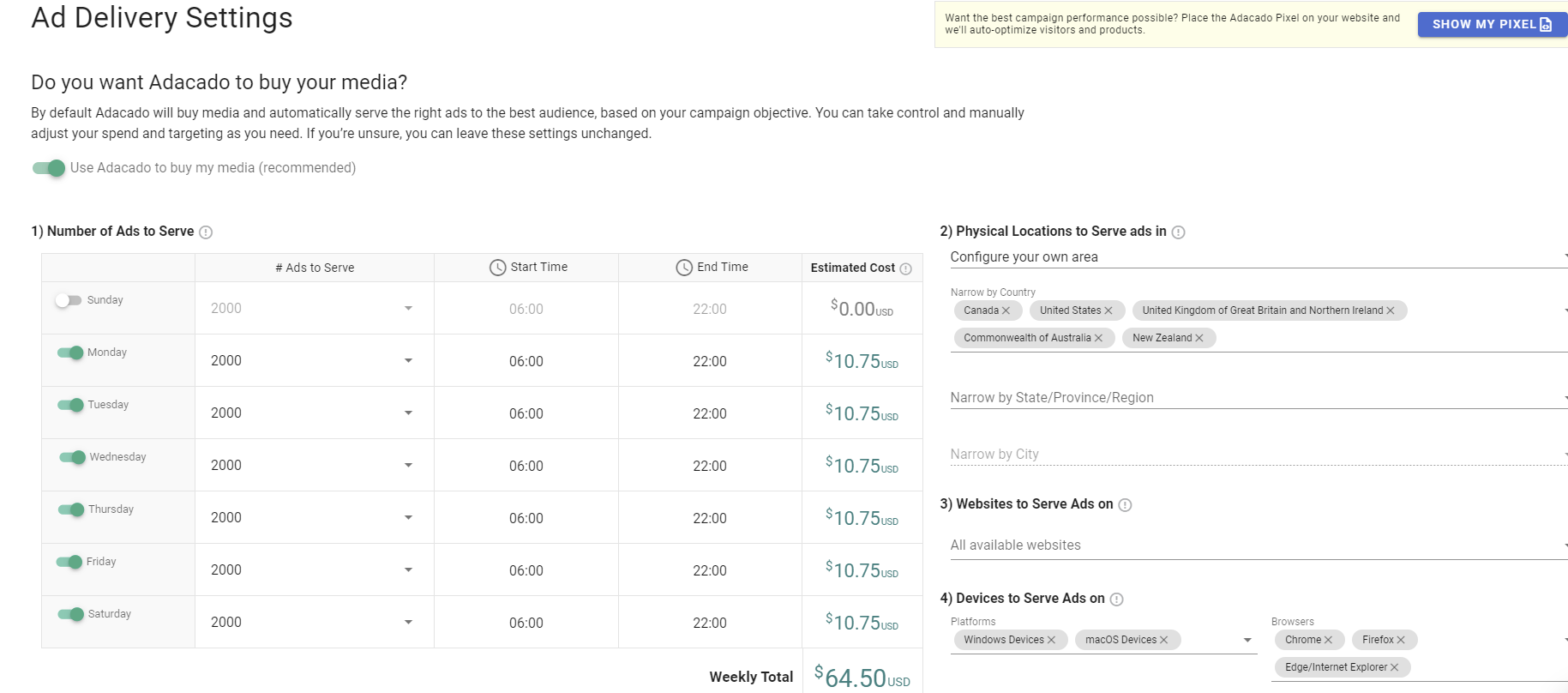
Adacado’s media buy section is designed to help simplify the process for its users.
When you arrive at Adacado’s ad delivery settings, the first thing you will see is “Do you want Adacado to buy your media”. By using Adacado’s media, you are setting yourself up for better results, more accurate tracking, and a lower cost than by using any other media platform.
The first thing you will notice is an ad schedule with the option to choose the number of ads you want to serve per day.
I will guide you through the components of Adacado’s media buy process as well as give you tips on best practices for running your first ad campaign through Adacado’s full DIY ad solution.
Components of Adacado’s Media Buy:
1. # of ads served/time & day
2. Locations to serve ads in
3. Websites to serve ads on
4. Devices to serve ads on
5. Languages to serve ads for
1. # of ads served
In this section of Adacado’s ad delivery settings, you have the option to select what days you want your ads to serve and which days you want “turned off”.
As well, you can choose to serve between 500 and 7500 ads a day. You can also choose the start and end times for when you want your ads to show.
With all options chosen, Adacado will estimate your daily costs as well as a weekly total to give you an idea of how much you will be spending.
If you’re new to Adacado and need a little bit of guidance, we recommend that you start off very simple. When it comes to days of the week – try Monday through Friday to make sure you’re hitting enough people during the week.
In terms of # of ads served, start modest and make sure you are serving the identical number of ads per day so that you can monitor which days are doing best. With that, select a wide range of time to get the most eyes on your ads.
Of course, once you have gathered enough data, you can adjust as you see fit.
2. Locations to serve ads in
Whether you’re a small business or a big corporation, you can choose to target people as narrowly or as broadly as possible.
You can choose to target ads around your location or configure your own area to your liking and have the ability to narrow down by state/province/region and city.
It is recommended that you start off broad within your geographic area. Or, if your business is world wide, target areas where you do most of your business.
3. Websites to serve ads on
Adacado offers a variety of categories of websites – suited for different business types to serve ads on.
Fashion, sporting goods, electronics, and jewelry are just a few of the categories Adacado offers to its users.
To start off, it is recommended you choose all available website categories to make sure you are showing ads to as many people as possible.
Like always, once you gather enough data, you can start to refine your targeting.
4. Devices to serve ads on
Next, you have the ability to pick which devices/browsers you would like your ads to show on.
Are you looking to target a younger audience? Perhaps, choosing all macoOS devices would be suitable.
For the purposes of gathering the most data, choosing “all devices”, would be most useful to gather enough information.
5. Languages to serve ads for
This is an especially important part of the media buying settings.
Are the ads you built in the creative editor in english and are you trying to target users who are english speaking?
If yes, then picking only English is probably a good choice. While starting broad in other components of Adacado’s ad delivery settings is a good idea, you want to make sure you’re targeting people with the right language.
With Adacado’s simplified media settings, it makes it easy for you to get your ads launched and shown across websites quickly.
While keeping our suggestions in mind, you will instantly reach thousands of users across the web.
Remember – start broad, and once you gather enough data from your ads, you can start to narrow down and target a more specific audience.